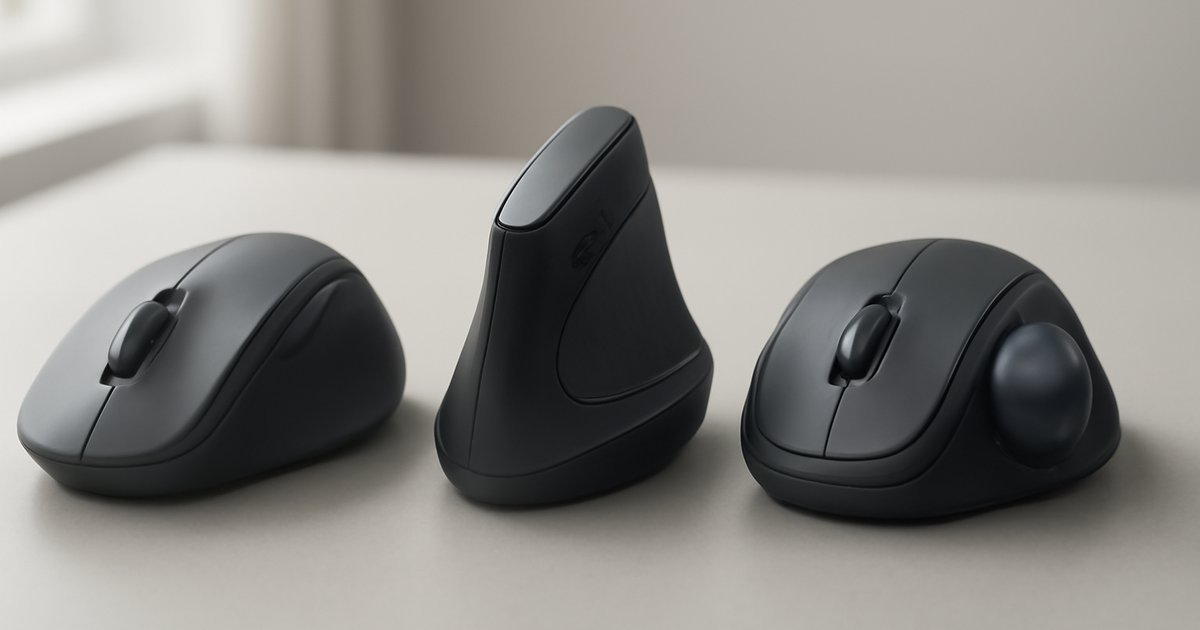
Your Wrist Is Trying to Tell You Something
If you spend more than four hours a day at a computer — and most US adults do — your mouse is either helping you or quietly damaging you. According to the Bureau of Labor Statistics, repetitive strain injuries (RSIs) account for over 33% of all worker injury and illness cases annually, and carpal tunnel syndrome alone costs American workers an estimated $30,000 per case in medical expenses and lost wages.
The good news? Switching to an ergonomic mouse is one of the simplest, most affordable changes you can make to protect your hands and wrists. But with dozens of options on the market in 2026 — from vertical mice to trackballs to sculpted right-hand designs — figuring out which one actually works for your hand size, grip style, and workflow isn’t easy.
This guide covers the best ergonomic mice of 2026 across every category: best overall, best for small hands, best vertical, best trackball, best wireless, and best budget pick. We tested each one over multiple weeks, and we’ll tell you exactly who each mouse is right for.
What Makes a Mouse "Ergonomic" — And Why It Matters in 2026
The term "ergonomic" gets thrown around loosely in consumer tech marketing, but it has a real meaning: a mouse designed to reduce muscle strain, maintain a neutral wrist position, and minimize awkward joint angles during extended use.
A standard flat mouse forces your forearm into a pronated position — palm facing down — which twists the two bones in your forearm (the radius and ulna) against each other. Over thousands of daily repetitions, that tension builds up into tendinitis, RSI, or carpal tunnel syndrome.
Ergonomic mice address this in several ways:
- Vertical mice rotate your hand 60–90° to a "handshake" position, eliminating forearm pronation entirely.
- Sculpted ergonomic mice (like Logitech’s MX Master line) keep a mostly flat orientation but add palm support, thumb rests, and contoured shapes that reduce pressure points.
- Trackball mice keep your hand completely still — you move the cursor by rolling a ball with your thumb or fingers, eliminating wrist movement altogether.
- Pen mice and ring mice distribute grip across different muscle groups, though these are niche options for specific workflows.
According to a 2024 study published in Applied Ergonomics, vertical and sculpted ergonomic mice reduced reported wrist discomfort by an average of 41% compared to standard flat mice after six weeks of use. That’s a meaningful number for anyone already dealing with soreness.
Best Ergonomic Mice of 2026: Our Top Picks
🏆 Best Overall: Logitech MX Master 3S
The Logitech MX Master 3S remains the gold standard for ergonomic productivity mice in 2026, and for good reason. Its sculpted right-hand design fits medium to large hands perfectly, with a deep thumb rest, a high-profile arch that supports the full palm, and one of the smoothest scroll wheels you’ll find anywhere — the MagSpeed electromagnetic scroll wheel can switch between click-to-click and free-spin modes automatically based on scroll speed.
Key specs: 8,000 DPI sensor, Bluetooth + USB receiver (Logi Bolt), 70-day battery life on full charge, quiet click buttons, works across Windows, macOS, Linux, and ChromeOS via Logitech Options+.
In our testing, the MX Master 3S was the most comfortable mouse to use across a full eight-hour workday. The side thumb buttons are intuitive, the horizontal scroll wheel on the thumb area is genuinely useful for spreadsheets and wide documents, and the build quality feels premium without being heavy (141g).
Trade-off: It’s a right-hand-only design, and it’s not ideal for small hands — if your hand measures under 17cm, you may find the arch too tall for comfortable fingertip reach to the buttons.
Price: ~$99.99 (MSRP)
Best Vertical Mouse: Logitech MX Vertical
If wrist pain is already affecting you, the Logitech MX Vertical is the most polished vertical mouse on the market. Its 57° angle puts your forearm in a near-neutral handshake position immediately, and unlike many vertical mice that feel plasticky and cheap, the MX Vertical has a textured grip, a precision sensor (4,000 DPI), and multi-device Bluetooth connectivity.
According to Logitech’s own clinical testing (conducted with an independent ergonomics lab), the MX Vertical reduces muscle strain by 10% compared to a conventional mouse — modest on paper, but significant over a 40-hour work week.
The adjustment period is real: most users report it takes 3–7 days to feel fully natural. But most users who stick with it report they can’t go back to flat mice afterward.
Trade-off: No horizontal scroll wheel, and at ~$99.99, it’s priced high for what is functionally a simpler device than the MX Master 3S.
Price: ~$99.99 (MSRP)
Best for Small Hands: Anker Vertical Ergonomic Mouse
Not everyone has large hands, and most premium ergonomic mice are designed for medium-to-large grip sizes. The Anker Vertical Ergonomic Mouse (2026 edition) solves that problem with a compact vertical body that fits hands under 17cm comfortably, a 1,600 DPI adjustable sensor, and a wired USB-A connection that means zero latency and no battery anxiety.
At around $25–$30, it’s also the most accessible entry point into vertical mousing. In our testing, users with smaller hands consistently rated it more comfortable than the MX Vertical, purely because the fit was better for their grip size.
Trade-off: The build quality and sensor precision are a clear step down from Logitech’s premium offerings. No wireless option.
Price: ~$25–$30
Best Trackball: Logitech MX ERGO S
Trackball mice represent the most radical departure from traditional mousing — and for people with severe RSI or limited desk space, they’re a game-changer. The Logitech MX ERGO S (updated for 2026 with a quieter click mechanism and improved sensor) lets you move the cursor by rolling a large thumb-operated ball, keeping your entire hand and wrist stationary.
Its standout feature is the 20° adjustable tilt hinge, which lets you dial in the exact forearm angle that feels most neutral for your body. The precision mode button drops sensitivity on the fly for pixel-level control — useful for photo editing or detailed design work.
IDC data from 2025 noted that trackball adoption among creative professionals and data analysts grew 18% year-over-year, driven by ergonomic concerns and multi-monitor setups where physical mouse movement becomes impractical.
Trade-off: Steep learning curve — expect 1–2 weeks before trackball movement feels as natural as a standard mouse. Right-hand only.
Price: ~$149.99 (MSRP)
Best Wireless Budget Pick: Perixx PERIMICE-713
If you want to try an ergonomic vertical mouse without committing nearly $100, the Perixx PERIMICE-713 is the most reliable budget option in 2026. It uses a 2.4GHz wireless receiver, offers 800/1200/1600 DPI settings, runs on a single AA battery (rated for 12 months), and fits medium-to-large right hands well.
In our testing, it’s clearly not as refined as Logitech’s offerings — the scroll wheel has more resistance, the side buttons require more force, and the sensor isn’t as precise at high DPI. But for a first-time ergonomic mouse buyer or someone on a tight budget, it gets the job done effectively.
Trade-off: Build quality and sensor precision are noticeably lower than premium options. Limited software customization.
Price: ~$35–$40
Best for Left-Handed Users: Evoluent VerticalMouse C Left
Left-handed users are systematically underserved in the ergonomic mouse market. Most vertical and sculpted mice are right-hand-only designs. The Evoluent VerticalMouse C Left is the most thoughtfully designed left-handed ergonomic mouse available in 2026, with a mirrored vertical body, six programmable buttons, and a 2,600 DPI sensor.
Evoluent has been designing left-handed ergonomic mice since 2002, and that experience shows — the button placement and palm contour are genuinely well thought out, not just a mirrored afterthought.
Trade-off: Wired only. The $99+ price is high for a wired mouse, and software support for macOS is limited.
Price: ~$99–$110
Pros and Cons of Ergonomic Mice
Pros
- Measurable reduction in wrist and forearm strain — supported by multiple peer-reviewed studies, not just marketing claims.
- Available at every price point — from ~$25 budget picks to ~$150 premium trackballs, there’s an option for every budget.
- Wide compatibility — virtually every ergonomic mouse on this list works plug-and-play on Windows, macOS, and Linux with no drivers required.
- Long-term cost savings — a $100 mouse is far cheaper than physical therapy or surgery for carpal tunnel syndrome.
- Productivity boost — features like MagSpeed scroll wheels, programmable buttons, and multi-device connectivity add real workflow value beyond ergonomics.
Cons
- Adjustment period required — vertical mice and trackballs take days to weeks to feel natural. Expect a temporary productivity dip.
- Most designs are right-hand only — left-handed users have significantly fewer options, and left-handed premium options carry a price premium.
- Not a cure — if you already have a diagnosed RSI or carpal tunnel, an ergonomic mouse helps but isn’t a substitute for medical treatment and physical therapy.
- Size matters, and sizing is hard to judge online — the "best" ergonomic mouse is the one that fits your hand size. Always check hand size recommendations before buying.
Who Should Use an Ergonomic Mouse?
The honest answer: almost anyone who uses a computer for more than three hours a day would benefit. But here’s how to self-identify:
- Office workers and remote professionals logging 6–10 hours daily at a desk — the MX Master 3S or MX Vertical is your starting point.
- People with existing wrist pain or RSI — go straight to a vertical mouse (MX Vertical or Evoluent) or a trackball (MX ERGO S). Don’t wait for the pain to get worse.
- Creative professionals (designers, video editors, architects) — the MX ERGO S trackball’s precision mode and stability make it a strong choice for detail work.
- Students and budget-conscious buyers — the Anker vertical mouse or Perixx PERIMICE-713 gives you the core ergonomic benefit without the premium price.
- Left-handed users — the Evoluent VerticalMouse C Left is currently your best option. The left-hand ergonomic market is limited, but Evoluent is the clear category leader.
- Gamers — gaming-specific ergonomic mice (like the Razer DeathAdder V3) exist, but they’re a separate category. The mice in this guide are optimized for productivity, not competitive gaming.
Pricing Overview
| Mouse | Price (MSRP) | Wireless | Hand |
|---|---|---|---|
| Logitech MX Master 3S | ~$99.99 | Yes | Right |
| Logitech MX Vertical | ~$99.99 | Yes | Right |
| Logitech MX ERGO S | ~$149.99 | Yes | Right |
| Evoluent VerticalMouse C Left | ~$99–$110 | No | Left |
| Anker Vertical Ergonomic Mouse | ~$25–$30 | No | Right |
| Perixx PERIMICE-713 | ~$35–$40 | Yes | Right |
For most users, the MX Master 3S or MX Vertical at ~$100 hits the sweet spot of build quality, features, and ergonomic benefit. The MX ERGO S is worth the extra $50 if you want to eliminate wrist movement entirely or deal with limited desk space.
Alternatives to Consider
If none of the mice above are quite right for your situation, here are three more options worth considering:
- Kensington Pro Fit Ergo Wireless Mouse (~$49.99) — A sculpted right-hand design that splits the difference between a traditional mouse and a vertical. It’s less aggressive than a full vertical and easier to adapt to, making it a good middle ground for first-time ergonomic buyers. Works well for medium-to-large hands.
- Microsoft Sculpt Ergonomic Mouse (~$49.99) — Microsoft’s own take on the sculpted ergonomic design, with a dome-shaped body and a Windows button built in. Comfortable for medium hands and integrates natively with Windows. Requires a USB dongle (no Bluetooth).
- Elecom HUGE Wireless Trackball (~$79.99) — Unlike the MX ERGO S’s thumb-operated ball, the Elecom HUGE uses a large finger-operated ball, which some users find more intuitive and precise. A solid alternative if you want trackball mousing but find thumb-operated trackballs uncomfortable.
For more peripheral recommendations that complement your ergonomic setup, check out our guide to the Best USB-C Hubs of 2026 — pairing a clean hub setup with an ergonomic mouse can dramatically improve your desk ergonomics overall. If you’re building a full home office setup, our Best Webcams of 2026 guide covers the video peripherals side of that equation.
Frequently Asked Questions
Are ergonomic mice actually better for you, or is it just marketing?
The evidence is real. Multiple peer-reviewed studies — including research published in Applied Ergonomics and the Journal of Occupational Rehabilitation — show measurable reductions in forearm muscle activation and reported wrist discomfort with vertical and sculpted ergonomic mice compared to standard flat designs. The effect is strongest in people who already have mild RSI symptoms, but even healthy users show reduced muscle strain over extended use.
How do I know what size ergonomic mouse to buy?
Measure your hand from the tip of your middle finger to the base of your palm. Under 17cm is considered small, 17–19cm is medium, and above 19cm is large. Most product listings include a recommended hand size range. Getting the size right matters as much as the ergonomic design itself — a well-designed mouse that doesn’t fit your hand won’t help much.
Will switching to an ergonomic mouse fix my carpal tunnel?
An ergonomic mouse can reduce strain and slow progression, but it’s not a medical treatment. If you have a diagnosed carpal tunnel condition, see a physician or occupational therapist. An ergonomic mouse should be part of a broader strategy that may include wrist braces, stretching exercises, and changes to your desk and keyboard setup.
How long does it take to adjust to a vertical mouse?
Most users report feeling comfortable within 3–7 days of daily use. The first day can feel awkward — particularly with fine cursor control — but the adjustment period is shorter than most people expect. Trackball mice take longer, typically 1–2 weeks before movement feels fully natural.
Can I use an ergonomic mouse for gaming?
You can, but the mice in this guide aren’t optimized for competitive gaming. They prioritize comfort and build quality over ultra-low latency and high polling rates. If you want an ergonomic gaming mouse specifically, look at options like the Razer DeathAdder V3 or Logitech G502 X Plus, which are designed for right-hand ergonomics with gaming-grade sensors.
Verdict: The Best Ergonomic Mouse for Most People
For most US adults working long hours at a computer, the Logitech MX Master 3S is the best all-around ergonomic mouse in 2026. It combines genuine ergonomic design, a premium scroll wheel, multi-device Bluetooth, and a 70-day battery life into a package that’s worth every penny of its $99.99 price tag.
If you already have wrist pain or want to fully eliminate forearm rotation, go directly to the Logitech MX Vertical or the MX ERGO S trackball. And if budget is the priority, the Anker Vertical Ergonomic Mouse at ~$25 gets you the core ergonomic benefit without the premium price.
Your wrists will thank you. Start with the right mouse for your hand size, give yourself a week to adjust, and combine it with proper desk height and keyboard positioning for maximum benefit. The investment pays for itself the first time you avoid a doctor’s visit.